Showing posts with label Camera. Show all posts
Showing posts with label Camera. Show all posts
Monday, March 25, 2013
HTC One S Price in India 3G Android Mobile with 4 3 Inch Display 8 MP Camera Features
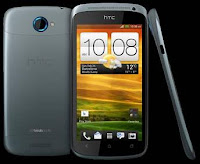
HTC Launches another high end mobile phone HTC One S in India. HTC One S comes with features like Android 4.0 Ice Cream Sandwich OS, HTC Sense UI, 1.7GHz Processor, 8 Mega Pixel Camera, VGA Camera in front for video calling, 16GB Internal Memory support, Corning Gorilla Glass Display with 4.3 Inch Touchscreen, 1080p HD Video Recording, 3G, Wi-Fi, GPRS, EDGE, Bluetooth and more. Lets talk about HTC One S price, features & specifications.
HTC One S Price in India:
8MP Camera Phone with 3G Android features HTC One S Price in India is around Rs. 32000.
Available Colors:
Black, Gray
HTC One S Key Features:
Android v4.0 (Ice Cream Sandwich) OS
4.3-inch AMOLED Capacitive Touchscreen
1.7 GHz Dual Core Processor
8 MP Primary Camera
Full HD Recording
3G Connectivity
Wi-Fi Enabled
16GB Internal Memory Support
HTC One S Technical Specifications:
Company: HTC
Model: One S
Mobile Type: Touchscreen
OS: Android 4.0 Ice Cream Sandwich OS with HTC Sense UI 4.0
Dual SIM: No (Single SIM)
Processor: 1.5 GHz Dual Core
Display:
4.3 Inch Super AMOLED capacitive touchscreen
Resolution: 540 x 960 pixels
Corning Gorilla Glass
Network:
2G Network: GSM 850 / 900 / 1800 / 1900
3G Network: HSDPA 850 / 900 / 2100
Dimensions & Weight:
Dimensions: 130.9 x 65 x 7.8 mm
Weight: 119.5 g
Camera:
8 MP Camera with autofocus, LED flash, check quality
3264×2448 pixels Resolution
Simultaneous HD video and image recording
geo-tagging
face and smile detection
Front Camera: 0.3MP
Memory and Storage:
Internal Memory: 16 GB
1GB RAM
Connectivity:
Chipset: Qualcomm MSM8260A Snapdragon
GPU: Adreno 225
3G: HSDPA, HSUPA
Wi-Fi 802.11 b/g/n, DLNA, Wi-Fi hotspot
Bluetooth v4.0 with A2DP
DLNA Support
GPRS
EDGE
USB microUSB (MHL) v2.0
Loudspeaker
3.5mm jack
GPS Nevigation with A-GPS
Browser: HTML, Adobe Flash
SMS (threaded view), MMS, Email, Push Email
JAVA Support via Java MIDP emulator
TV-out (via MHL A/V link)
Multimedia:
HD Video Recording 1080p@30fps
Multi Format Audio Player: MP3, eAAC+, WMA, WAV
Multi Format Video Player: MP4, H.263, H.264, WMV
MP3, WAV, Polyphonic Ringtones
Stereo FM radio with RDS
Beats Audio
Beats headset
Battery:
1650 mAH Li-ion Battery
Apps:
Social Networking
Google Search, Maps, Gmail, YouTube, Calendar, Google Talk
Other Features:
Gyro Sensor
G-Sensor
Digital Compass
Proximity Sensor
Ambient Light Sensor
Video Stabilization
25 GB Dropbox Space
Audio Recording
Voice Input
TV Out Port
Sales Pack:
Handset
Battery
Charger
Earphone
USB Cable
User Manual
Warranty Card

Sunday, December 23, 2012
Panasonic BL-C101 Setup Guide
In order for your camera to send images to Jabbakam, a trigger must be set.
The Panasonic BL-C101 has two triggers that can upload multiple images to Jabbakam to be
processed into a video clip:
1. Motion Detection
This is the recommended trigger, which this setup guide refers to.
2. Alarm
This is for more advanced users who want to connect an external trigger (e.g. door sensor,
heat sensor, weight sensor etc.) to trigger the camera to begin uploading images.
For more information on setting up an Alarm trigger, see the manufacturer’s user manual.
finf here
Readmore...
The Panasonic BL-C101 has two triggers that can upload multiple images to Jabbakam to be
processed into a video clip:
1. Motion Detection
This is the recommended trigger, which this setup guide refers to.
2. Alarm
This is for more advanced users who want to connect an external trigger (e.g. door sensor,
heat sensor, weight sensor etc.) to trigger the camera to begin uploading images.
For more information on setting up an Alarm trigger, see the manufacturer’s user manual.
finf here
Installation Guide Network Camera BL-C101
This manual is written for both the BL-C101 (Wired Type) and BL-C121 (Wireless/Wired Type). Available features and operations vary slightly
depending on the model. You can confirm the model no. of your camera by checking the model no. printed on the front of the camera.
Model number suffixes (“A”, “CE”, and “E”) are omitted from the following model numbers shown in this document, unless necessary.
BL-C101A, BL-C101CE, BL-C101E, BL-C121A, BL-C121CE, BL-C121E
Please read the included Important Information before proceeding.
Complete Operating Instructions and all other documentation can be found on the included CD-ROM.
• This document (Installation Guide) explains how to physically connect the camera to the power supply and network, as well how to mount or place the
camera for regular use.
• The Setup Guide describes how to set up the camera so that it can be accessed using a PC.
• Refer to the Operating Instructions on the CD-ROM for details regarding the camera’s features.
• Refer to the Troubleshooting Guide on the CD-ROM if you have any problems configuring or using the camera.
ge here
Readmore...
depending on the model. You can confirm the model no. of your camera by checking the model no. printed on the front of the camera.
Model number suffixes (“A”, “CE”, and “E”) are omitted from the following model numbers shown in this document, unless necessary.
BL-C101A, BL-C101CE, BL-C101E, BL-C121A, BL-C121CE, BL-C121E
Please read the included Important Information before proceeding.
Complete Operating Instructions and all other documentation can be found on the included CD-ROM.
• This document (Installation Guide) explains how to physically connect the camera to the power supply and network, as well how to mount or place the
camera for regular use.
• The Setup Guide describes how to set up the camera so that it can be accessed using a PC.
• Refer to the Operating Instructions on the CD-ROM for details regarding the camera’s features.
• Refer to the Troubleshooting Guide on the CD-ROM if you have any problems configuring or using the camera.
ge here
Subscribe to:
Posts (Atom)