Thursday, March 14, 2013


Wednesday, March 13, 2013
Mobile Phone Opening Tools
There are all tools when you are try to open mobile phone or iphone. you can get a good idea about tools which do you want to buy and what are the necessary for doing it.
Opening Tools

- Screwdrivers


- case opening pry opener


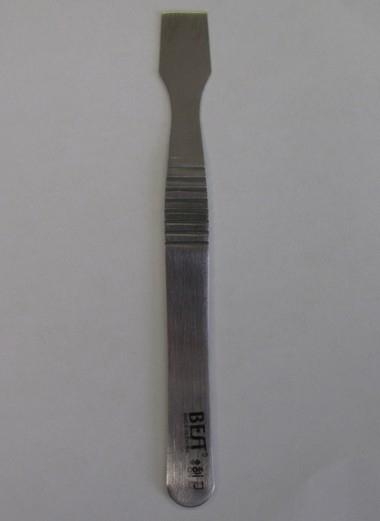
- Triangle Opening Prying Pick


- Lens sucker ( i phone)


- Dust protection kit for iPod

- PCB Holder

- Tweezers


If you want to know How you can opening your mobile phone or iphone please check following link. Good Luck and have a nice future.
Tuesday, March 12, 2013
How to reset Huawei Ascend P1s

There are two types of resetting and one is soft reset and another is hard reset. Soft reset can change your personal phone setting but hard reset can erase all data such all personal data and installed application. Hard reset can bring phone to its original state. Resetting can be called as many ways, Here I’ll show you how to reset Huawei Ascend P1s . And some one ask as following ways: How to restore Huawei Ascend P1s . How to factory reset Huawei Ascend P1s . How to factory restore Huawei Ascend P1s . How to format Huawei Ascend P1s . How to master reset Huawei Ascend P1s . How to soft reset Huawei Ascend P1s . How to full reset Huawei Ascend P1s . How to full restore Huawei Ascend P1s . How to full erase Huawei Ascend P1s . All Data Will Be Lost ! Back Up Your Data Before Doing Hard Reset.
Hard Resetting Huawei Ascend P1s
With power off the phone press and hold Volume Up + Send + power On button. From the recovery
menu select wipe date/factory reset with volume button. Now go to Yes to delete all user data
Then go to wipe cache partition > Yes wipe cache.
Hard reset Huawei Ascend P1s by menu
From the home screen press manu key and touch setting.
Touch the privacy
Touch Factory data reset
Touch reset phone
Touch erase everything
** Do not hard reset if you really need it.
** Sometimes hard reset may damage your device permanently.
** Do not forget to back up your useful date before hard reset your Huawei Ascend P1s
because hard reset will erase all data from your phone including installed applications.
Monday, March 11, 2013
UNLOCK HUAWEI WIMODE EC 325

Software Required:
1. BitPim v1.0.7 Freeware ( to read SPC )
2. Cdma Workshop v3.4.1 Demo
3. Manual Tutorial Unlock
Download BitPim v1.0.7 Freeware
Click Link : BitPim v1.0.7 Freeware
Download Workshop v3.4.1 Demo
Click Link : cdma_workshop
The first step you should do the following
- You must know the SPC (Service Provider Code) With BitPim Software v1.0.7, the usefulness of the software. Must Know Before First Install Modem driver to connect by PC. Once the driver is installed and connected to the first configuration to a Computer Please : My Computer -> Manage -> Device Manager

Then Click: Properties (Setting Notice Image)

At the ADVANCED Port Number in the change to : 2


in the "Phone Model Settings" window select "Carriers" as "Other", "Manufacturers" as "Other" and "Models" as "Other CDMA phone". Click Next

In the "Communication Port Settings" window you see will of all the available ports, choose COM2 port. On selecting COM2 port Datacard you can see information under "Port Detail"

Now in BitPim go to "View" and select "View Filesystem". This Will add one more option in left pane. That new option Select "File System", on middle pane, click on + symbol to open navigate to "nvm" directory. Right pane shows the file system available in That directory. Double click on "nvm_0002" file and it Will show the content

Write down the number highlighted in yellow color, this is the SPC code and it Could be different in your case. Just write down this 6 digit number somewhere. Step 1-6 were the resource persons done only to Obtain this SPC code.


Now we are in important step. Go to “Other” tab and under “R-UIM’s config” select “R-UIM if avail”*** and press “Write” button. If writing process is successful then it will show message. Close “CDMA Workshop” software it show message, click yes and you are done


Sunday, March 10, 2013
Nokia N8 Water Damage Shorted Problem Solution

Nokia N8 Water Damage Shorted Problem Solution
Nokia N8 Water Damage Shorted Problem
Nokia N8 Water Damage Shorted Solution
Nokia N8 Water Damage Fully Shorted
Saturday, March 9, 2013
How to Hard Reset Huawei D51 Discovery
 When you are going to handover your phone to other person, you need to clear your saved personal data. Or when you are going to sell your used phone, you need to remove all data and your personal phone setting. This is called resetting phone. Sometimes resetting is needed when some difficulties occur with the phone such phone became very slow,or freeze, or phone shows abnormal behavior. Some times resetting can save your money by prohibiting you from purchasing a new phone.
There are two types of resetting and one is soft reset and another is hard reset. Soft reset can change your personal phone setting but hard reset can erase all data such all personal data and installed application. Hard reset can bring phone to its original state. Resetting can be called as many ways, Here I’ll show you how to reset Huawei D51 Discovery . And some one ask as following ways: How to restore Huawei D51 Discovery . How to factory reset Huawei D51 Discovery . How to factory restore Huawei D51 Discovery . How to format Huawei D51 Discovery . How to master reset Huawei D51 Discovery . How to soft reset Huawei D51 Discovery . How to full reset Huawei D51 Discovery . How to full restore Huawei D51 Discovery . How to full erase Huawei D51 Discovery . All Data Will Be Lost ! Back Up Your Data Before Doing Hard Reset.
Hard Reset Huawei D51 Discovery
After fully charged Huawei D51 Discovery battery and take the the sim card
On dialing screen of your Huawei D51 Discovery type these code ##258741 then press call button.
** Do not hard reset if you really need it.
** Sometimes hard reset may damage your device permanently.
** Do not forget to back up your useful date before hard reset your Huawei D51 Discovery because hard reset will erase all data from your phone including installed applications.
Friday, March 8, 2013
How to Hard Reset HTC Desire C

If you face some difficulty with your mobile such mobile is very slow or it is hanging and mobile shows any unexpected behavior.
If there is a problem with any installed application which you cannot uninstall. When a mobile is not working properly or not responding quickly you may have to reset it. It is advisable to execute soft reset first and if soft reset could not solve your problem then you need to hard reset. Many cell phone company gives user the opportunity to hard reset their mobile by may way and many mobile users say hard reset as many names which described below.
HOW TO RESET A HTC DESIRE C:
You May Call As:
HOW TO RESTORE A HTC DESIRE C:
You May Call As:
HOW TO FORMAT HTC DESIRE C:
You May Call As:
HOW TO MASTER RESET HTC DESIRE C:
You May Call As:
HOW TO FACTORY RESET HTC DESIRE C:
You May Call As:
HOW TO HARD RESET HTC DESIRE C:
You May Call As:
HOW TO FULL RESET A HTC DESIRE C:
You May Call As:
HOW TO FULL RESTORE A HTC DESIRE C:
You May Call As:
HOW TO MASTER RESTORE HTC DESIRE C:
You May Call As:
HOW TO MASTER RESET HTC DESIRE C:
You May Call As:
HOW TO FULL FACTORY RESET HTC DESIRE C:
You May Call As:
HOW TO HARD FORMAT HTC DESIRE C:
HTC DESIRE C Factory Resetting:
1. From the Home screen, press applications and then tap Settings.
2. After above Tap SD and phone storage > Factory data reset.
3.Now Tap Reset phone, and then tap Erase everything.
HARD RESETTING BY BUTTON:
1. Take out the battery, stay for a few seconds, and then reinsert the battery.
2. Press and hold the VOLUME DOWN button, and after that briefly press the POWER button.
3. Stay for the screen with the three Android images to appear, and after that free the VOLUME DOWN button.
4. Press VOLUME DOWN to choose FACTORY RESET, and after that press the POWER button.
Important:
* Please Do Not Reset Your Mobile without Any Unrecoverable Difficulty.
** Hard Reset Will Erase All User Data from Your HTC Desire C.
So Keep In Mind To Back Up Your Important Data Before Hard Reset.
*** Please Fully Charge Your Phone Battery before Reset Because Any Power Failure May Damage Mobile Permanently.
****Some Times Reset Can Damage Your Mobile.
* Please Do Not Reset Your Mobile without Any Unrecoverable Difficulty.
** Hard Reset Will Erase All User Data from Your HTC Desire C.
So Keep In Mind To Back Up Your Important Data Before Hard Reset.
*** Please Fully Charge Your Phone Battery before Reset Because Any Power Failure May Damage Mobile Permanently.
****Some Times Reset Can Damage Your Mobile.
Subscribe to:
Posts (Atom)